 AiXCEL Solutions
Monitoring & Alerts
Every automation watched by deterministic checks. Failures arrive with the cause and a fix to approve.
Built in your own accountsA person approves every fixHanded over with a runbook
3 workstreams that keep your automations running:
On timeLateMissed
Onboarding · Intercom returned 401 (x3)
n8n · detected by status-code check · 09:02
- Reconnect the Intercom credential
- Replay the 3 failed runs
- Log the result and close the incident
Teams that run on AiXCEL systems







Connects to the tools you already use
- n8n
- Make
- Zapier
- Slack
- Gmail
- HubSpot
- HighLevel
- Stripe
- Intercom
- Airtable
Instrument every automation
A fixed-scope build in your own accounts. We map your workflows and their owners, then wrap each one in deterministic checks, route what they find to a named person and queue a fix for approval.
Choose your platform
What gets built
- A map of your workflows, their owners and their exceptions
- Checks for status codes, missing fields, heartbeats and volume drops
- Duplicate handling, safe retries and an exception queue
- Alerts that name the owner and explain the cause
Platforms
Deterministic checks
Rules, not guessesStatus codesMissing fieldsHeartbeatsVolume dropsGroup & explain
Route to owner
Fix awaiting approvalDetection comes first
An incident opens from events, thresholds and explicit checks. A model's explanation is never the only evidence that something is wrong.
AI explains, within bounds
The model sees only the bounded context of one incident and writes the likely cause in plain words, with the source events attached.
A person approves the fix
Each incident reaches a named owner with a proposed fix. Nothing is changed until someone approves it.
Health checks and uptime
The watching continues after handover. ErrorLens, the module that does the watching, is delivered inside this service rather than as a standalone product. Heartbeats and polling confirm each automation is running, a failed check opens one incident, and a person approves the fix before anything changes.
- Heartbeats received
- 14:30 · heartbeat missed, incident opened
- 14:42 · fix approved by a person
- 14:51 · resolved and logged
- Always on
Heartbeats
Each workflow reports in on its schedule. A missed heartbeat is a failed check, not a hunch.
Deterministic - Every few min
Polling
ErrorLens polls your platforms for health, uptime and errors.
- On a failed check
Incident opened
One grouped incident, the source events attached, and an alert to the named owner.
Slack alert - On approval
A person approves
The proposed fix waits for a person. Nothing changes until it is approved.
Person approves - After the fix
Resolved and logged
The incident closes and the result is recorded for the next review.
Logged
A person approves every fix before it runsChecks run on a schedule, not on someone remembering
Alerts that arrive with the answer
A fresh error reaches Slack with the platform, the failing step, the likely cause in plain words and a fix waiting for approval.
HighNew incident · Onboarding
- Platform
- n8n
- Detected by
- Status-code check
- Owner
- Named in the alert
- Grouped
- 3 failed runs
Interactive example · demo data. Try the button.
- Polling every few minutes across n8n, Make and Zapier
- Alerts on fresh errors, grouped by cause
- Source events attached to every incident
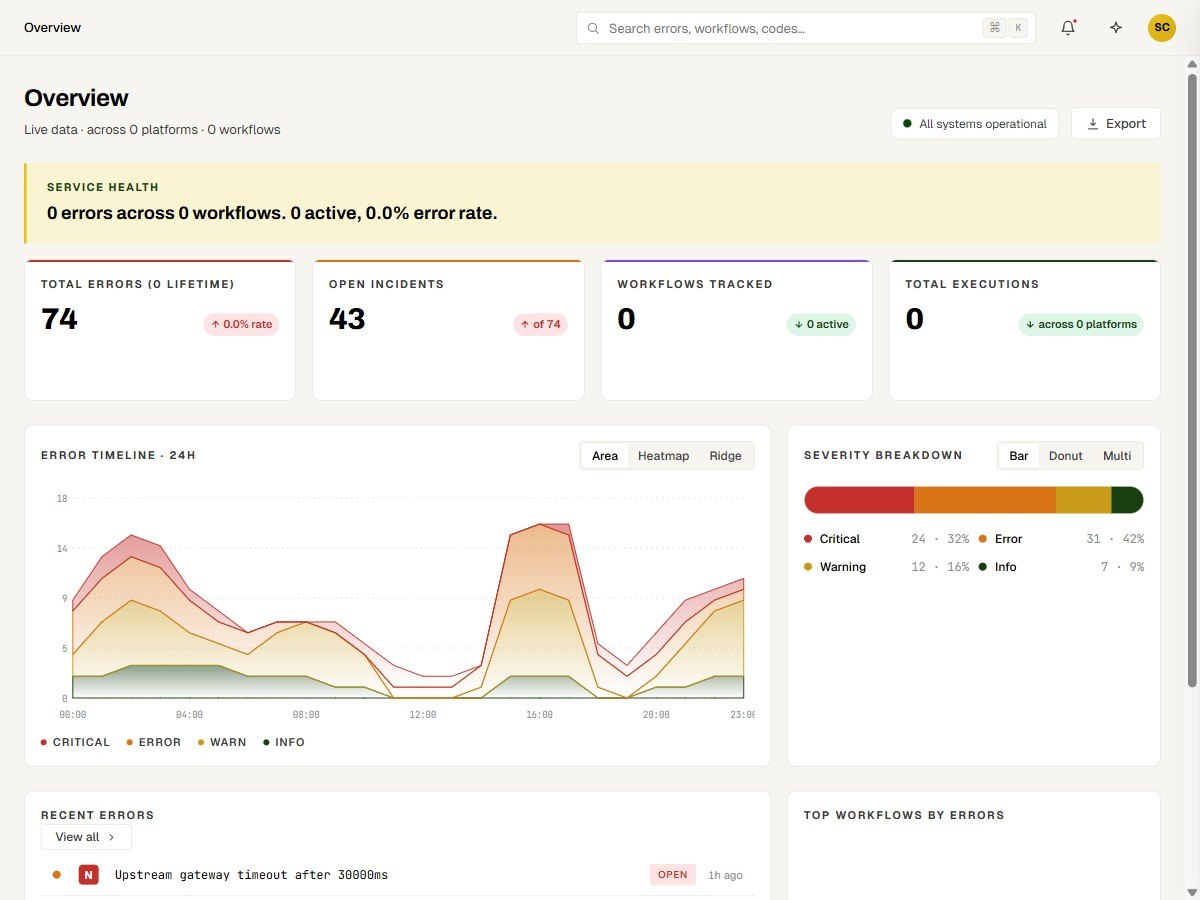
- An error timeline over 24 hours, by severity
- Open incidents, with recent errors per workflow
- n8n, Zapier and Make failures grouped, explained and fixed with approval
ErrorLens monitors health, uptime and errors across their n8n, Make and Zapier automations, polling every few minutes, with Slack alerts on fresh errors.
ErrorLens in 15 seconds
Safe migrations
Moving from Make to n8n is more than copying steps. Timing, credentials, data formats, retries and who owns exceptions can all change. We inventory first and check behaviour before any traffic moves.
Move the behaviour, keep the useful parts
Rebuilding workflows one by one repeats common logic and makes it hard to know whether the new system behaves like the old one. So we group the patterns first and compare both.
- Inventory
- Patterns
- Parity checks
- Cutover
- An inventory of workflows, dependencies and owners
- Shared integration and transformation patterns, grouped
- A bounded migration batch with representative fixtures
- Behaviour checks, a cutover plan and a rollback path
- Runbooks and handover for n8n
How an engagement runs
Sprints are fixed-scope and priced before we start. Ongoing monitoring runs as a subscription. Every engagement is built in your accounts and handed over.
- 01
Map
Thirty minutes with Ahmad. We map your automations, their owners and where a failure would go unseen today.
- 02
Instrument
Checks, alert routing and a fix-to-approve path wrapped around your first workflows, in your own accounts.
- 03
Test the failure paths
Run the same event twice, send incomplete data and take a connected tool down, then confirm each failure stays visible.
- 04
Hand over
The keys, a runbook, an operating checklist and training, so your team can run it without us.
- 05
Keep watching
Monitoring continues as a subscription. Improvements and support are scoped separately.
Can the AI change anything on its own?
External actions need explicit authorization and tested rules. The AI explains an incident, and drafting, review and execution stay separate steps. A proposed fix waits for a person to approve it.
Why detect first and explain second?
Incidents open from events, thresholds and explicit checks, such as status codes, missing fields, heartbeats and volume drops. A model then explains the recorded events in plain words, using only that incident's context. If executions stop completing, the missing completions raise the alert, not a model's opinion.
How do you migrate from Make to n8n without breaking things?
We inventory the workflows, group shared patterns and migrate a representative batch before estimating or switching the rest. The same input is replayed against the original and the rebuilt workflow, error handling is compared as well as output, and only one workflow owns external writes during cutover. A rollback path is agreed first.
What happens before you quote, and how is it priced?
We review the workflows, their owners, the tools involved and the access needed. The proposal then defines the scope, assumptions, responsibilities and acceptance criteria. Sprints are fixed-scope and priced before we start; ongoing monitoring runs as a subscription.
What happens after handover?
Documentation, an operating checklist, a runbook and training are part of the agreed delivery. Ongoing monitoring, improvements and support are scoped separately.
Schedule a workflow mapping call
Thirty minutes with Ahmad. We map which automations run unwatched today and what we would put checks around first.
Book a workflow mapping call